
Clipping path vs image masking is a common question, because both do the same job: they separate a product from its background so you can put it on white, on a color, or into a new scene. They suit different edges, though, and they cost different amounts. Pick the wrong one and you either pay for precision you didn’t need, or get a cut-out that looks pasted on.
What a clipping path is
A clipping path is a vector outline drawn around the product with Photoshop’s pen tool, point by point. Everything inside the line is kept and everything outside is removed. Because it is a vector, the edge is perfectly clean at any size, and the path is saved inside the file, so you or anyone else can reuse it later.
Paths work best for products with firm, defined edges: shoes, bags, bottles, boxes, electronics, furniture, most packaged goods. A multi-clipping path goes a step further and gives each part of the product its own path, so a sneaker’s sole, laces and upper can be recolored or adjusted separately.

What image masking is
Image masking works with pixels instead of lines. Rather than a single outline, the retoucher builds a mask that can be partly transparent, so a strand of hair, the fibres of a fur collar or the edge of a glass can blend into a new background the way they would in real life.
Masks are for edges a pen tool can’t follow: hair and fur, lace and mesh, feathers, fringing, smoke, motion blur, and anything transparent or translucent like glass, liquid or sheer fabric. They take longer because the retoucher works the edge by hand, often strand by strand where it shows.
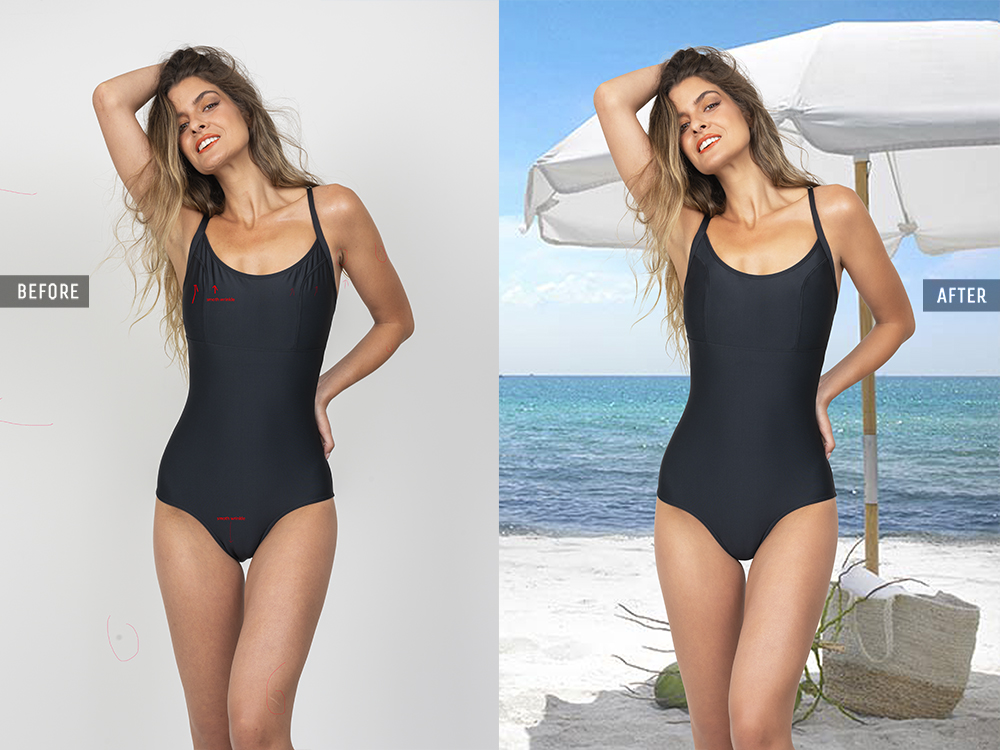
Side by side
| Clipping path | Image masking | |
|---|---|---|
| Edge type | Firm, defined | Soft, fine or see-through |
| How it’s made | Vector outline with the pen tool | Pixel mask refined by hand |
| Transparency | Fully in or fully out | Partial, so edges blend |
| Good for | Shoes, bags, bottles, electronics, furniture | Hair, fur, lace, mesh, glass, liquid |
| Delivered as | Path saved in the PSD, TIFF or JPEG | Layer mask in a PSD, or a PNG with transparency |
| Our price per image | $0.75 / $1.50 / $3.00 | $2.00 hair / $4.00 fur and lace / $6.00 glass and liquid |
A quick test for your own images
This is roughly the check we run on every incoming order:
- Could you trace the edge with a pencil without lifting it? If yes, a clipping path will do.
- Does anything stick out? Loose hairs, fur, frayed threads or fringing need a mask.
- Can you see through any part of it? Glass, liquid, sheer fabric and mesh need a mask, or they’ll look solid.
- Where will the image go? If it only ever sits on white, small soft edges matter less. If it will go on colors or into scenes, soft edges need masking or they’ll show a halo.
When an image needs both
Plenty do. A model holding a handbag needs a mask for her hair and a path for the bag. A perfume bottle has a hard outline but a transparent body. In those cases the retoucher combines the two, using a path wherever the edge is firm because it’s faster and cleaner, and a mask only where it has to be. We grade the image by its hardest part and tell you the level before you pay.
What about automatic cut-outs?
AI background removers are good at the easy half of this: a dark shoe on a light floor, a bottle against a plain wall. They struggle where the work gets hard. Hair against a background of similar tone, white products on white, glass, and lace all tend to come back with chewed edges, a soft halo or missing detail. For a few social posts that may be fine. For a product page where the cut-out is shown at full size and zoomed, check every edge, or have it done by hand.
Clipping path and masking questions
Can a JPEG keep a clipping path?
Yes. A path drawn in Photoshop can be saved in a JPEG as well as in a PSD or TIFF, so you can reuse it later. Transparency is different: a JPEG can’t store it, so masked images with soft edges are delivered as PSD or PNG.
Is masking always better?
No. On a firm edge, a path is cleaner and cheaper. Masking a shoe costs more and gives a softer edge that you didn’t want.
Who decides which one my images get?
We do, image by image, and we show you the level with the delivery before you pay. If you’d rather choose, say so in the brief.
Not sure which your products need? Send three images through the free trial and we’ll tell you, with the edited files. More detail on our clipping path service, image masking service and pricing.
The Clipping Lab Journal, from the post-production studio Korno Hasan founded in Kushtia in 2012. About the studio →
Your next 3 images are on us.
Send them tonight. See them finished tomorrow, with a quote for the rest.
- Back within 24 hours, usually sooner
- No card, no contract
- Your files stay private