
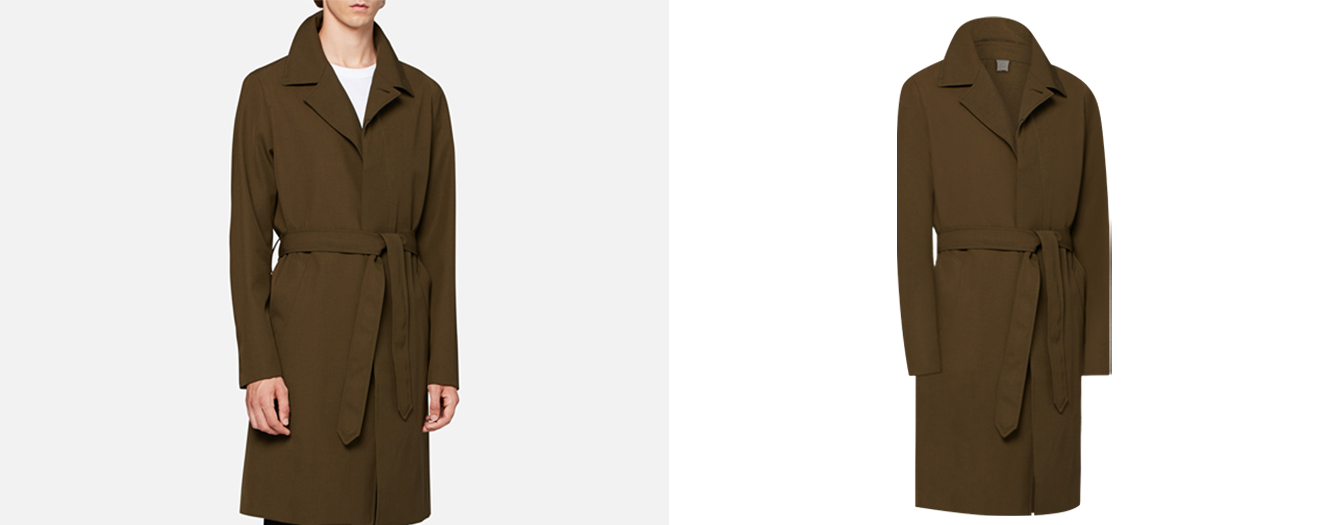
Product photo editing has split in two. The easy half, cutting a dark shoe out of a light background, is now done by software in seconds, and few brands pay a person for it any more. The hard half has grown: catalogs that have to match image for image, AI images that have to be checked against the real product, files that must pass marketplace and legal rules, and new formats like 360° spins. This guide covers what brands need from product photo editing in 2026, what it costs, and what to plan for in 2027.
Updated November 2026. Prices are in US dollars per image.
The short answer
- Simple cut-outs are now a software job. Paid editing has moved to the work tools still get wrong: fine edges, reflective products, apparel, and making a whole catalog match.
- Consistency sells. In Photoroom’s May 2026 survey of UK shoppers, 63% said inconsistent product imagery makes a seller or marketplace look unreliable, and 87% called visuals the most important factor in a purchase.
- AI images need a human check. In a 2025 Clutch survey, 57% of people failed to spot AI photos, yet 84% said disclosure is important and nearly 40% would trust a brand less if it used AI images without saying so.
- The rules are tightening. Google Merchant Center requires AI-generated product images to keep their IPTC
trainedAlgorithmicMediatag, and enforces a 500 × 500 pixel minimum from 31 January 2027. The EU AI Act’s transparency rules have applied since 2 August 2026. - Prices still start under a dollar. Basic clipping starts at $0.75 an image. The cost sits in Complex images: jewelry, sheer fabric, full apparel sets and AI fixes.
What is product photo editing?
Product photo editing is the post-production that turns a raw product photo into an image that is ready to sell: separating the product from its background, cleaning and retouching it, correcting its color, adding a shadow, and exporting it at the size and format each sales channel asks for. In 2026 it also covers a newer job: checking images that were generated or changed with AI, and correcting them until they show the product as it really is.
Why demand has shifted
Three things changed at about the same time.
Software took the easy work. Automatic background removal is now built into phone apps, marketplaces and design tools. On a clean, high-contrast product it is good enough, so brands have stopped paying per image for it.
Shoppers judge the whole page, not one photo. A category grid or product page is seen as a set. If one image is warmer, tighter or missing its shadow next to its neighbours, the seller looks careless. The Photoroom figure above puts a number on that.
Platforms and regulators now ask what is real. Google wants AI-generated images labeled in their metadata, and the EU now requires many kinds of AI-generated content to be marked. Brands need to know which of their images are edited photos and which are generated, and keep the records straight.
Search behaviour points the same way. In US keyword data from Ubersuggest (November 2026), “ai product photography” draws more searches each month than “product photo editing service”, and queries such as “realistic ai product photography” and “ai product photography fail” now sit alongside it. People are trying AI first, then looking for help when the results don’t hold up on a product page.
What brands are paying for in 2026
1. Consistency across every SKU
Most of the value in a catalog edit is sameness: the same crop and margins, the same background value, the same shadow and the same color, across hundreds of products shot on different days, sometimes by different photographers. That takes a written style guide and a team that works to it, image after image. Matching color to a physical swatch or Pantone reference matters most for apparel, cosmetics and furniture, where the buyer will hold the delivered product next to the photo.
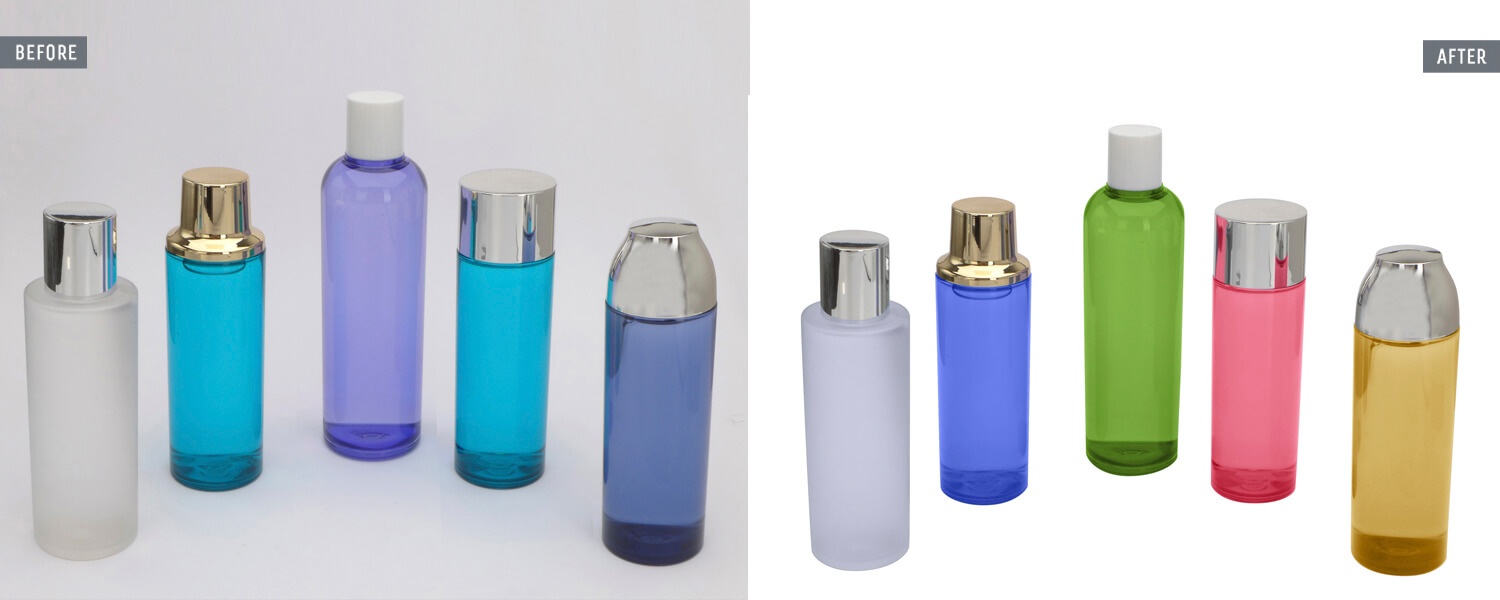
More on our color correction and color matching service. Matching to your swatch or Pantone is a $0.50 add-on per image.
2. Fixing AI-generated and AI-edited product images
Generative tools are quick with backgrounds, scenes and models, and much less reliable with the product itself. Typical faults: a logo or label with warped letters, stitching or hardware that has quietly changed, the wrong number of buttons, hands and fingers that don’t look right, fabric that turns glossy or plastic, and light on the product that doesn’t match the scene around it. Each one can mean the buyer receives something different from the picture.
An AI image fix compares the image with the real product, corrects what changed, and hands back a file that is accurate. If the image was generated, its metadata should stay in place, because Google Merchant Center asks for the AI tag to be kept (more on that below). Our AI image fix is priced at $5, $10 or $20 an image, depending on how much has to be rebuilt.
3. Ghost mannequin and flat lay for apparel
Apparel is still where hand work earns its price. A ghost mannequin edit removes the mannequin, joins in the inside of the neck and back, and keeps the garment’s natural shape and drape. Done well, the fabric keeps its texture and the sleeves sit evenly. Done badly, or by a tool that smooths everything, knitwear looks like plastic and collars collapse. Flat lays need the same care with creases, lint and shape.
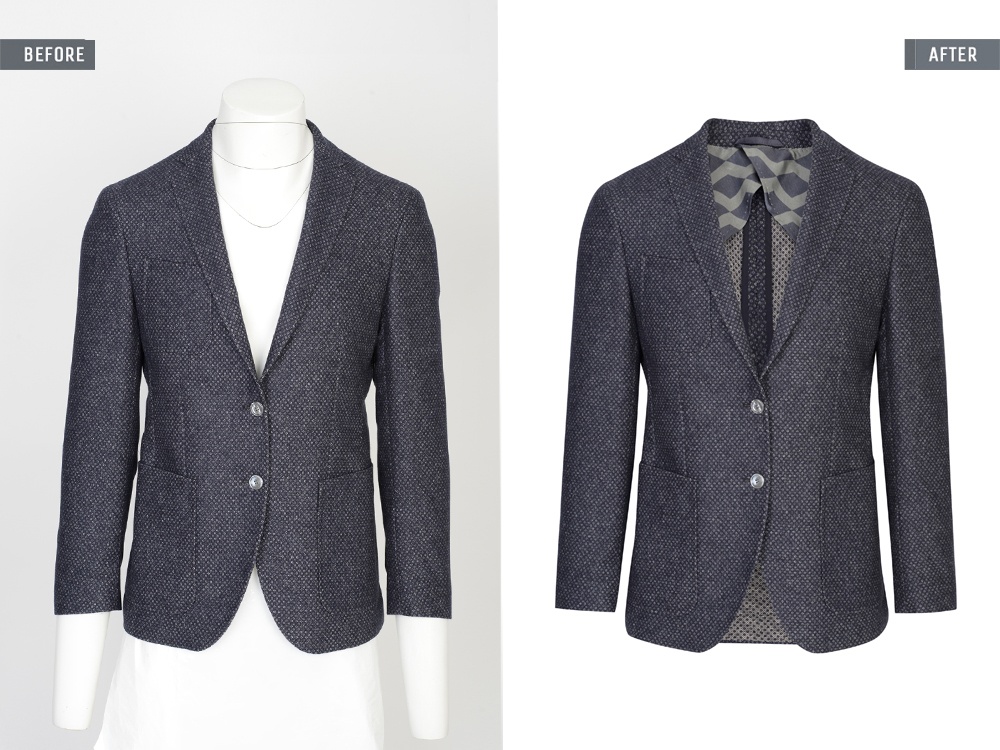
See our ghost mannequin service (from $2.50) and flat lay photo editing (from $1.00). If you shoot apparel yourself, our guide to ghost mannequin photography covers the shots an editor needs.
4. Jewelry, watches and reflective products
Metal, gemstones, glass and polished surfaces reflect the studio around them. Retouching them means controlling those reflections, evening out the metal tone, bringing back the light in the stones, and removing the dust and scratches a macro lens shows clearly. Automatic tools tend to flatten reflections or blur fine detail, which is exactly what a jewelry buyer zooms in to check.


More on our jewelry and watch retouching, from $3.00 an image.
5. Fine edges: hair, fur, lace and glass
Hair against a busy background, fur collars, lace, mesh and anything transparent still need masking by hand. An automatic cut-out will usually leave a halo, chewed edges, or glass that looks solid. The test is simple: open the product page image at 200% and look at the edge.
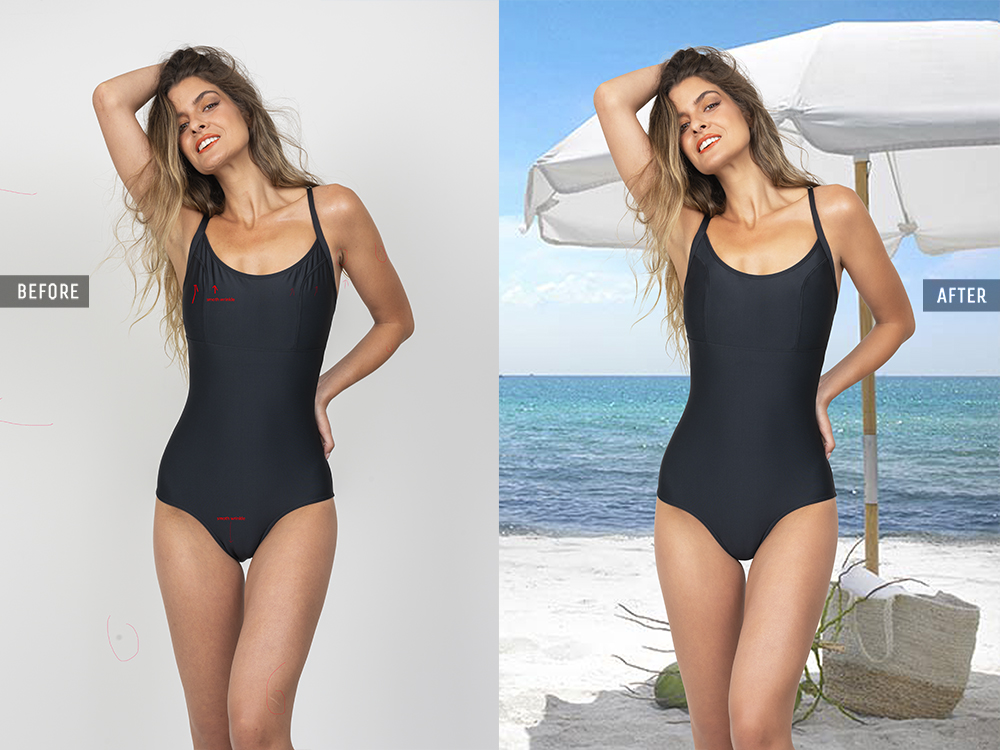
See our image masking service (from $2.00), and our guides to clipping path vs image masking and white products on a white background.
6. Natural shadows and reflections
A product with no shadow looks pasted onto the page. Brands now ask for a shadow that matches the way the product was lit, and for the same shadow on every image in the range: a soft drop shadow, the natural shadow kept from the original shot, or a mirror reflection for glossy goods.

More on our shadow and reflection service. A shadow on a Basic image is a $0.30 add-on.
7. Marketplace-ready exports
Each sales channel has its own rules. Amazon’s main image still needs a pure white background. Google Merchant Center has been warning about small images since April 2026 and will enforce a 500 × 500 pixel minimum from 31 January 2027. Your own store theme wants one aspect ratio across the grid. The efficient way to handle all of it is one edited master per product, then exports cut to each channel’s size, crop and background.


See our marketplace image editing for Amazon, Google Shopping and store-ready exports.
8. 360° spins and multi-angle sets
An interactive spin lets a buyer turn the product, which answers questions a single photo can’t. A spin is a set of frames, often somewhere between 24 and 72, and the editing is about consistency more than any one frame: the same position, exposure, color and cleanup in every frame, so the product turns smoothly instead of jumping or flickering.
More on our 360 product photography editing, quoted per set.
9. AI scenes and AI models built around the real product
The safest way to use AI for lifestyle images is to start from a real, edited product photo and build the scene or the model around it, so the product itself is never invented. You get the speed of AI with a product that matches what ships. That is how our AI product scenes and AI fashion models work, quoted per set after a free test.
What brands have stopped paying for
Brands rarely pay a person now for background removal on a simple, high-contrast product, for basic resizing and renaming, or for a plain square crop. Tools do those well enough.
A person still adds value on that same work in three cases: when the image will be zoomed on a product page, when the product is white on white or has a soft edge, and when hundreds of images need to match. That is why ecommerce photo editing services still offer cut-outs, and why a clipping path, which saves a reusable vector outline inside the file, still starts at $0.75 an image. For simple jobs, see our background removal service.
Software or retoucher? A quick guide
| Job | Software is usually enough | Send it to a retoucher |
|---|---|---|
| Background removal | Dark product on a clean, light background, for social posts | White on white, hair, glass, lace, or any image zoomed on a product page |
| Color | Rough auto-correction for social posts | Matching a swatch or Pantone across a whole range |
| Shadows | A generic soft drop shadow | A natural or reflection shadow that matches across the catalog |
| Apparel | A flat lay on a plain board in good light | Ghost mannequin, neck joins, fabric texture, symmetry |
| Jewelry and watches | Rarely | Metal tone, stone sparkle, reflections, dust and scratches |
| AI-generated images | Mood boards and concepts | Any image that shows the real product to a buyer |
| 360° spins | Rarely | Frame-to-frame alignment, exposure and cleanup |
What to plan for in 2027
Label AI images, and keep the records
Google Merchant Center’s rule is direct: “All AI-generated images must contain the IPTC DigitalSourceType trainedAlgorithmicMedia tag”, and sellers must not strip it. In the EU, the AI Act’s transparency obligations under Article 50 have applied since 2 August 2026, with providers of generative tools already on the market given until 2 December 2026 to add machine-readable marking. Article 50 carves out AI that only performs an assistive function for standard editing or does not substantially alter the original, so a retouched real photo and a fully generated scene are treated differently. This is not legal advice; check the rules for each market you sell in.
In practice: keep a simple record for each image (shot and edited, AI-assisted, or generated), keep metadata intact on export, and tell your editor which images are which.
Bigger minimum image sizes
Google Merchant Center’s 500 × 500 pixel minimum applies across all product categories from 31 January 2027, with warnings running since 14 April 2026. Keep full-resolution masters and export down to each channel, so a new rule means a new export, not a reshoot.
More frames per product
Our view: spins, multi-angle sets and short product videos are becoming normal on product pages, and each one adds frames that have to match. When you budget, plan for consistency across the set, not only cleanup per image.
The human job moves to accuracy and sign-off
Our view: AI will keep getting better at the easy jobs. The work people are paid for keeps moving toward checking accuracy against the real product, holding a brand’s style across thousands of images, and signing off what goes live.
How to brief a photo editor in 2026
- A style guide: background value, crop and margins, shadow type, file format and pixel size for each channel.
- Two or three approved images for the editor to match.
- Color references: a swatch, a Pantone number, or the physical product.
- A list of AI-generated or AI-edited images, with an instruction to keep their metadata.
- A test on your hardest images, not your easiest.
- A QA rule: who checks, at what zoom, and against what reference.
The full process is in our guide to outsourcing photo editing without losing control of quality.
What product photo editing costs in 2026
Prices for a product photo editing service vary widely between studios. These are Clipping Lab’s, in US dollars per approved image, as of November 2026. A layered PSD with paths is included at every level.
| Service | Basic | Advanced | Complex |
|---|---|---|---|
| Clipping path and background | $0.75 | $1.50 | $3.00 |
| Flat lay (apparel) | $1.00 | $2.00 | $4.00 |
| Product retouching | $1.50 | $3.00 | $6.00 |
| Image masking | $2.00 | $4.00 | $6.00 |
| Ghost mannequin | $2.50 | $4.00 | $6.00 |
| Jewelry and watch retouching | $3.00 | $6.00 | $12.00 |
| Fashion and model retouching | $3.00 | $6.00 | $15.00 |
| AI image fix | $5.00 | $10.00 | $20.00 |
Add-ons: color match to your swatch +$0.50, shadow on Basic images +$0.30, rush delivery in 6 hours +50%. 360° spins, AI product scenes and AI fashion models are quoted per set. Studios sending 500 or more images a month get 15% off every image. Full details are on our pricing page.
Product photo editing questions
Will AI replace product photo editors?
It has replaced much of the simplest work, such as background removal on easy products. It hasn’t replaced the work that decides whether a buyer trusts the page: matching a catalog, getting fine edges and reflections right, and checking that an AI image shows the real product. That work has grown as more brands use AI.
Is AI product photography good enough to replace a studio shoot?
For backgrounds, scenes and mood images it often is. For the product itself, start from a real photo: generated products drift in shape, color, text and detail, and the buyer receives the real thing. The most reliable approach is a real, edited product shot with an AI scene built around it.
How much does product photo editing cost?
Simple clipping and background work starts at $0.75 an image. Retouching, ghost mannequin, jewelry and AI fixes cost more, from $1.50 to $20 an image depending on complexity. 360° spins and AI scenes are usually quoted per set.
Do AI-generated product images have to be labeled?
For Google Merchant Center, AI-generated images must keep their IPTC trainedAlgorithmicMedia tag. In the EU, the AI Act’s transparency rules have applied since 2 August 2026, with an exception for AI used only for standard editing. Check the rules for each market you sell in.
What size should product images be in 2027?
Google Merchant Center enforces a 500 × 500 pixel minimum from 31 January 2027. Keep full-resolution masters and export to each channel’s size, so a new rule never means a reshoot.
Can you fix product images that were made with AI?
Yes. We compare the image with the real product, correct logos, text, details, hands and lighting, and keep the AI metadata in place. AI image fix starts at $5 an image.
How long does editing take?
Standard orders come back the next morning. Rush delivery in 6 hours costs 50% more. Free trial images come back within 24 hours, usually sooner.
Want to see where your own images stand? Send three of your hardest images through the free trial. We’ll edit them, tell you which level each one is, and quote the rest. You can also browse all our services or see the work.
Sources
- Clutch, 57% of Consumers Can’t Spot AI Photos, Business Wire, September 2025.
- IT Brief UK, UK shoppers wary of AI product images, survey finds (Photoroom survey data), May 2026.
- Google Merchant Center Help, image requirements for AI-generated images.
- Google Merchant Center Help, minimum image resolution update.
- EU AI Act, Article 50: transparency obligations.
- Goodwin, EU AI Act transparency obligations are now in force, August 2026.
The Clipping Lab Journal, from the post-production studio Korno Hasan founded in Kushtia in 2012. About the studio →
Your next 3 images are on us.
Send them tonight. See them finished tomorrow, with a quote for the rest.
- Back within 24 hours, usually sooner
- No card, no contract
- Your files stay private